
 View Cart
 sales@dataq.com
 330-668-1444
Now


- For compatible instruments, please click here
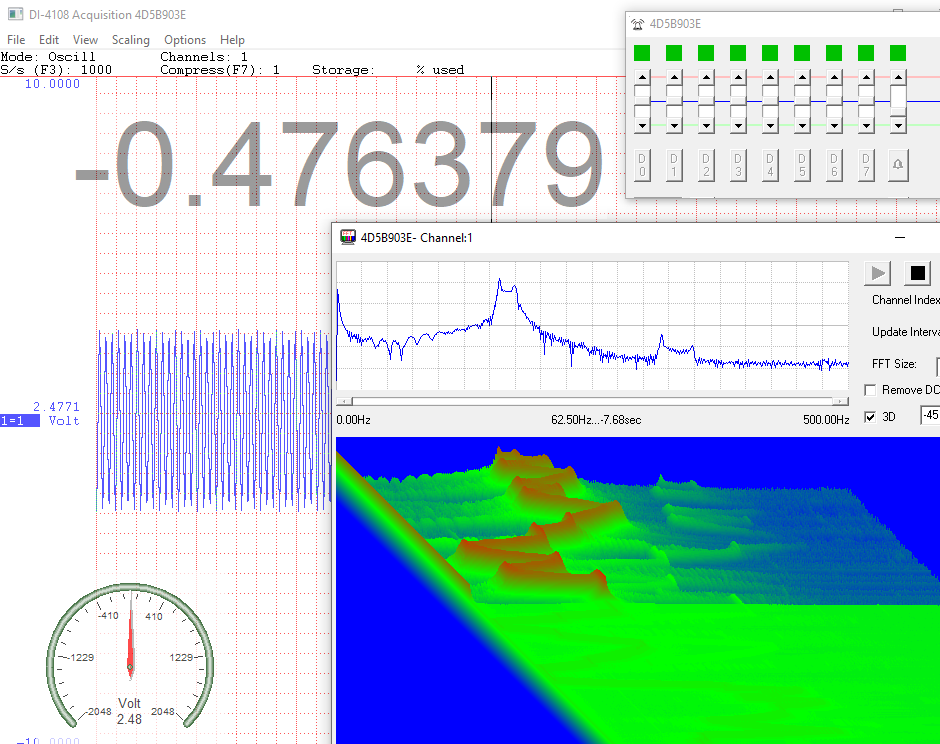
- Fast Fourier Transform (FFT) Live Display
- Waterfall Spectrogram Live Display
- Magic Meter Live Display
- Analog Gauge Live Display
- Programable Digital and Alarm Outputs for USB mode
- Automatically launch UtilityPack tools when WinDaq starts
- No programming needed
- The license stays with the instrument, so you can use the instrument on any PC
 Share
Share


Description
WinDaq UtilityPack contains two frequency domain tools, live FFT and Spectrogram displays, two visual assistants, Magic Meter and Analog Gauge, and a programable digital output for closed-loop control applications. All UtilityPack tools can be configured to launch automatically when WinDaq starts.


Related Software
WinDaq
Data Acquisition Recording and Playback Software
Included FREE with your Dataq Hardware purchase. Installs drivers and WinDaq recording and playback software. Includes optional Add-on software with a valid installation key.
WinDaq XY Viewers
Live XY charting for WinDaq and WWB
Originally designed for GE Mining Division, these two XY plotting utilities are great tools for trouble shooting their mining equipments.

WinDaq ExcelLink
WinDaq-to-Excel Real Time Link
High speed (up to 160K s/s) with powerful trigger methods to capture or stream data to Excel in real time, compatible with ChannelStretch, supports both 32- and 64-bit Excel. No programming is needed.
Specifications
| Software Requirements: | WinDaq Data Acquisition |
| OS supported | Any version of Windows that supports WinDaq acquisition software |
| Supported Instruments | DI-1100, DI-2108, DI-2108P, DI-2008, DI-4108, DI-4208, DI-4718B and DI-4730 |
| Performance | Multiple factors, especially the total number of enabled channels, determines if the addon has enough resource to run |